Why it exists
Bitcoin node operators argue about relay policy and consensus in places run by someone else: social networks, chat servers, mailing lists. The people running nodes are already connected to each other, through their nodes, but there is no way to talk over those connections.
There is a reason for that. The Bitcoin P2P protocol cannot carry chat. It has no message type for arbitrary data, and nodes disconnect peers that send unknown messages. Pushing chat into Bitcoin messages would harm the network.
So NodeSignal splits the job and says so plainly. Your node tells it who your peers are and what software they run. NodeSignal then opens its own encrypted connection, daemon to daemon, so two operators can talk directly with no server in the middle.
Inspired by my research into the Core vs Knots debate, I wanted an effective communication system, found through the Bitcoin P2P network, that lets operators of verified nodes talk to each other, display what their nodes declare support for, and hold a proper discussion on relay and consensus. It uses node peers for contact discovery, maps the connections, and opens its own authenticated channel between daemons so two operators can chat with no third party in between.
Connor Aherne · the research: bpi.connoraherne.com
How it works
Discovery. NodeSignal asks your node for its peer list with
getpeerinfoover RPC, read-only. The map is your node's real peer list.Identity. For a contact, NodeSignal opens a short, read-only
version/verackhandshake on the peer's port 8333 and reads what that node reports: user agent, implementation, version, block height, service bits and the capability messages it sends. It never sends chat over Bitcoin P2P.Transport. Messages go daemon to daemon on TCP port 8788 inside a standard Noise_XX_25519_ChaChaPoly_SHA256 session: X25519 key agreement, HKDF-SHA256, and ChaCha20-Poly1305 encryption. Both sides authenticate with a long-term key, and each session uses fresh ephemeral keys.
Key pinning (TOFU). The first time two daemons connect, each pins the other's key fingerprint. If that key ever changes, the connection is rejected and the operator sees both fingerprints and decides.
Reaching each other. Either side's connection carries messages both ways, so only one of the two operators needs to be reachable. With Tor installed, NodeSignal gives itself an onion address through Tor's control socket, so it is reachable behind any router with no port forwarding. Messages that cannot be delivered yet wait and retry, or wait sealed at a contact's mailbox, and the console says which.
Install
NodeSignal requires Bitcoin Core or Bitcoin Knots on the same machine (pruned is fine). Each download includes its own Node.js.
Source and install guides: github.com/Connor-03/NodeSignal
Windows
on the machine that runs the node
- Download
NodeSignal-Setup-windows-x64.exeandSHA256SUMS.txt. - Check the file. Windows PowerShell, in the download folder:
Get-FileHash .\NodeSignal-Setup-windows-x64.exe -Algorithm SHA256and compare with the line inSHA256SUMS.txt. - Double-click the .exe, with a normal double-click (not "Run as administrator"). SmartScreen warns because the file is not signed: choose More info, then Run anyway.
- Answer the questions: whether to hand the setup to your own AI agent instead (it then writes a brief for the agent and installs nothing), a display name, and two optional extras that default to No (advertising NodeSignal in your user agent, router port mapping).
- Restart your Bitcoin node once, so it reads NodeSignal's new RPC login. The installer tells you this and does not do it for you.
It installs to %LOCALAPPDATA%\NodeSignal, starts hidden when you sign in, and opens the console in its own window (Microsoft Edge's app mode: no tabs or address bar, its own taskbar icon) from a Desktop and Start menu shortcut. Closing the window does not stop NodeSignal receiving messages.
Linux
on the node
- Download the .deb for your machine and
SHA256SUMS.txt. - Check it. Linux, in the download folder:
sha256sum -c SHA256SUMS.txt --ignore-missing - Install it. Linux, on the node:
sudo apt install ./nodesignal-linux-amd64.deb(ornodesignal-linux-arm64.deb) - Restart bitcoind once so it reads the new RPC login. The installer says so and does not restart it for you. If bitcoin.conf uses
includeconfor sets RPC whitelists in a section or on bitcoind's command line, the installer leaves it alone and prints the lines to add by hand. - Check it. Linux, on the node:
sudo nodesignal status - The console asks for a login token, so other accounts on the machine cannot use it. Show it with:
sudo nodesignal web-token(Linux, on the node).
apt also installs Tor (the package recommends it), and NodeSignal then makes its own onion address. If nodesignal onion shows none, run sudo nodesignal onion on (Linux, on the node).
Opening the console
The console is served by the daemon on the node itself, on port 8789, and answers only on that machine (localhost:8789). From another computer, use an SSH tunnel. Linux or macOS terminal, or Windows PowerShell, on your other computer: ssh -L 8789:127.0.0.1:8789 <your node>, then browse to localhost:8789 there. On Linux, sign in once with the token from sudo nodesignal web-token (Linux, on the node).
Optional extras
Both off by default. Linux: sudo nodesignal ... on the node. Windows: %LOCALAPPDATA%\NodeSignal\nodesignal.exe ... in Command Prompt.
nodesignal advertise on: lets peers see you run NodeSignal. Public to every peer; takes effect when you restart your node.nodesignal port-mapping on: asks your router to forward the peer port. Exposes your IP on clearnet. Tor and Tailscale need no port mapping.
With your own AI agent New in 1.4
Give it docs/AGENT-SETUP.md from the repository, or on Linux run nodesignal agent-brief (Linux, on the node) and paste what it prints. Read its warning first: the agent will be able to read NodeSignal's secrets.
See it
Features
Map and identity
- The peer map comes from your own node's
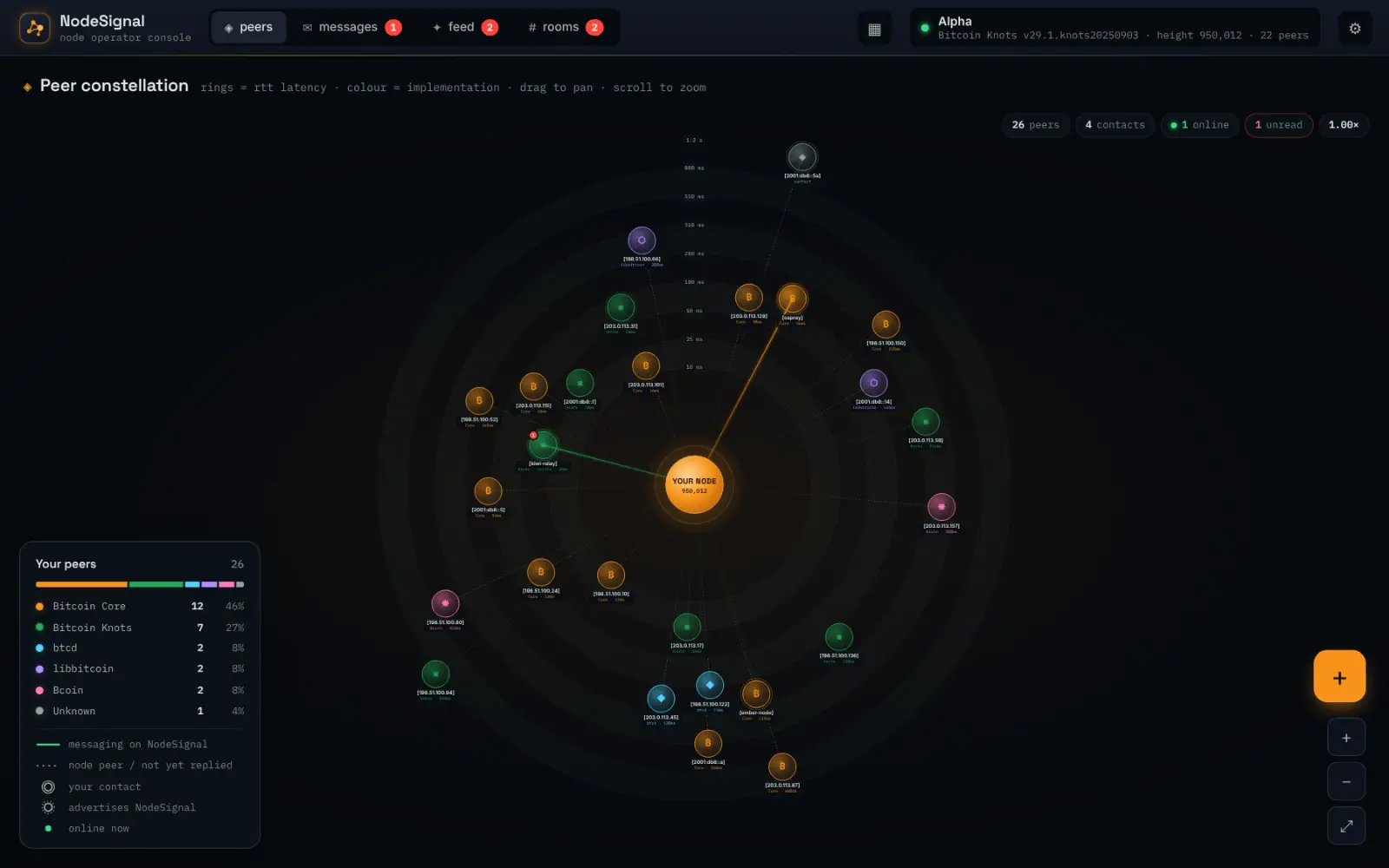
getpeerinfo, refreshed every 30 seconds. - Peers sit on rings by round-trip latency (10 ms to 1200 ms) and are coloured by implementation: Bitcoin Core, Bitcoin Knots, btcd, libbitcoin and Bcoin.
- Drag to pan, scroll or pinch to zoom, click any peer to open a chat with its operator.
- Adding a contact identifies their node over port 8333 automatically, with a few retries if it is not reachable yet; an "identify" button re-runs it.
- Identification reads the user agent, version, start height and service bits, and lists supported BIPs from the service bits and capability messages (for example BIP-141, BIP-152, BIP-159, BIP-339).
- BIP numbers an operator put in their user agent are shown as "signaling", labelled as declared.
- What a peer's daemon claims about its node never overwrites what NodeSignal measured itself over port 8333.
- Find other operators: peers whose user agent carries
nodesignalare marked. Advertising your own node is opt-in (nodesignal advertise onaddsuacomment=nodesignalto bitcoin.conf, with your onion address when you have one, so operators whose nodes peer with yours can message you over Tor). - Peers that cannot be messaged say why on the map: "via Tor", "this machine", "via I2P", "local network".
Encryption and keys
- Standard Noise_XX_25519_ChaChaPoly_SHA256, checked byte for byte against the published cacophony and snow test vectors.
- Mutual authentication with a persistent X25519 identity key per daemon, and forward secrecy from fresh ephemeral keys each session.
- A changed key is rejected, with a red banner. The operator sees the pinned and the presented fingerprint side by side and either accepts the new key or keeps the old one; accepting must name the exact fingerprint that was shown.
- A contact is recognised by its pinned key even if its IP address changes.
- Optional history passphrase: message text is sealed on disk (scrypt, X25519 sealed boxes, ChaCha20-Poly1305), and the daemon keeps receiving while locked. Wrong passphrases are slowed down.
Delivery
- Only one of two operators needs to be reachable: the reply rides back on the other side's connection.
- Undelivered messages retry on their own (30 s, 1, 2, 5, 10 and 30 minutes, then hourly) and give up after 7 days for an established contact, 1 day for one that has never replied. The console shows the reason and the next try, with "retry now" and "cancel".
- Established contacts get a check-in about every 3 minutes, so someone behind NAT can collect what is waiting for them.
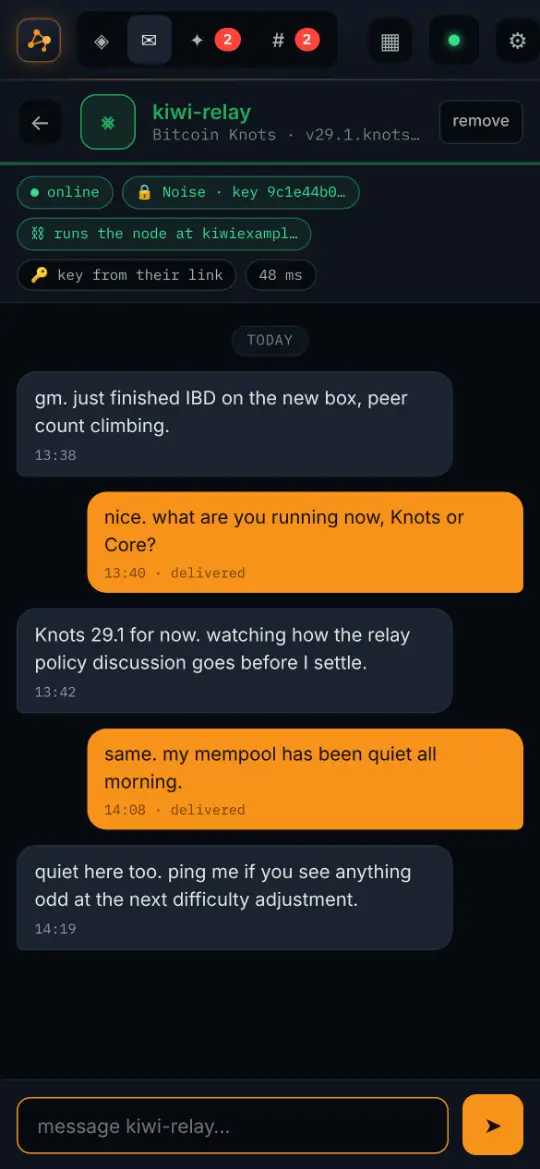
- Message states are honest: sending, delivered (only after the other daemon acknowledges it), retrying with the reason, or not delivered. A message typed while the console cannot reach its own daemon is kept in the browser and labelled "queued" until it can be handed over.
- A message delivered twice by a retry is stored once.
- A solid line on the map means a confirmed two-way exchange; a green dot means that contact was seen in the last 5 minutes.
- Notification cards for new messages, an unread count on the tab and in the page title. Locked history never shows message text in a notification.
Reaching each other New in 1.4
- Its own onion address, with no port forwarding and no torrc editing: install Tor and NodeSignal asks Tor's control socket for an onion service, the way bitcoind's
-listenoniondoes. The address stays the same across restarts.nodesignal onionshows it. - A contact is tried at its address first and its onion second.
.onionaddresses go through Tor's SOCKS5 proxy, never DNS. - Mailboxes, opt-in on both sides: a reachable contact can hold sealed mail for an operator who cannot be reached right now. The mailbox cannot read it (X25519 and ChaCha20-Poly1305, sender authenticated to the recipient), items expire after 7 days, and the sender sees "held at" and then "delivered" once collected.
- Several operators reaching you over Tor at once are told apart by their keys.
Networks
- IPv4 and IPv6 (receiving over IPv6 needs
"bind": "::"). - Tailscale: when a Tailscale interface exists, the peer port listens only there (and on 127.0.0.1, where Tor hands onion peers over) by default. Without Tailscale it listens on every interface; behind a home router nobody reaches it unless the port is forwarded, and
"bind": "127.0.0.1"keeps it to Tor. - Opt-in router port mapping (UPnP IGD or NAT-PMP), off by default.
Talking to more than one operator New in 1.4
- Feed: short posts (up to 1000 characters) signed with your key, passed to your contacts and at most one hop further by contacts who follow you. No server keeps them and nobody on the way can change them. A post from someone you have not talked to shows "name not verified" with its key.
- Rooms: topic rooms kept by their members' daemons. Start one, invite with a
nodesignal-room:link, read the history when you join; every message is signed by its author. - Contact links and QR codes:
nodesignal:<address>?port=...&fp=...&nick=.... Whoever adds it has your key pinned before the first connection. - Introductions, opt-in on both sides: contacts who turned them on pass each other's address and key, so adding one pins the right key.
- Same-onion proof: when a contact's NodeSignal answers on the onion address of a Bitcoin node, the console says that operator runs that node; only the holder of the onion key can serve both.
nodesignal same-onionexplains the setup.
Keeping it New in 1.4
- Identity backup: your identity keys and contacts in a passphrase-sealed file (scrypt and ChaCha20-Poly1305), from the console or
nodesignal backup;nodesignal restorekeeps the history already on the machine. Message history is not in the backup. - Update checks: once a day NodeSignal asks GitHub Releases whether a newer version exists (through Tor while its onion is up) and shows it in the console with its notes. It installs only a release signed with a release key the installed copy ships with, and never anything older. 1.4.0 ships no release key yet, so it announces new versions without installing them.
Check it yourself, or with your own AI agent New in 1.4
docs/AGENT-SETUP.mdis written for an AI coding agent the operator chooses (Claude Code, Codex, or an open-source one): run the tests, read the code and the self-audit, verify the download, install, and report. It lists what NodeSignal does on purpose, so a reviewer does not mistake it for hidden behaviour. The Windows installer offers this as its first question; on Linux,nodesignal agent-briefprints a brief with the machine's details. Both say first, plainly, that the agent will be able to read NodeSignal's secrets (the RPC password, the console token, the identity keys), and that a cloud agent sends what it reads to its provider.nodesignal rpc-access rotateandnodesignal web-token newreplace the RPC password and console token afterwards.
Running beside a node
- Works with Bitcoin Core and Bitcoin Knots, including pruned nodes: it only uses RPC methods that need no block history.
- RPC is read-only and limited to three methods:
getpeerinfo,getnetworkinfo,getblockchaininfo. Setup gives NodeSignal its own RPC login (anrpcauthline) with anrpcwhitelistof exactly those methods. The node's cookie file is never read. - Never runs as root. On Linux it runs as its own
nodesignalsystem user under a hardened systemd unit; on Windows it runs as your account, and the installer refuses an administrator window. - The web console is reachable from the same machine only, and refuses other sites and other host names. Use an SSH tunnel from another computer.
- Linux: the console asks for a login token, so other accounts on the same machine cannot use it.
sudo nodesignal web-tokenshows it. Windows needs no login. - No central server and no accounts: daemons connect to each other directly.
- Zero runtime dependencies: Node.js standard library only.
- Inbound connections are rate limited per source (/32 for IPv4, /64 for IPv6) and capped, and nothing is saved to disk before a completed handshake.
- Installers include their own Node.js and stop, with directions, if no Bitcoin node is installed.
- On Windows a small supervisor restarts the daemon if it stops, and gives up with a logged reason after repeated crashes.
- A
nodesignalcommand:status,advertise,port-mapping,rpc-access,open,onion,same-onion,updates,update,agent-brief,backup,restore,web-token,logs,version,uninstall. - The console asks no other server for anything: its fonts are inside the page, and its Content-Security-Policy lets it fetch only from its own daemon.
- Works on a phone-sized screen.
Honest limits
The test vectors prove noise.js computes the Noise specification correctly. They say nothing about the daemon around it. Nobody outside the project has audited it.
Before 1.4.0, four of them attacked one area each, and a fifth checked the result the way an operator's own agent would. They found 33 problems, among them a way for a stranger to receive messages meant for someone else and ways to get root on Linux; all were fixed with tests, and SECURITY-CRITIQUE.md section 10 lists each one and what is still open. Useful, but not an audit.
Anyone with a room link can join that room and read it from then on.
Behind a shared IP that can be someone else. A contact link or QR code pins the key first.
the port 8333 handshake sends /NodeSignal:1.4/ as its user agent, so nodes it reads learn that this IP runs NodeSignal even with advertising off.
With one, message text is sealed, but who you talk to and when, and the identity key (the daemon needs it unattended), stay readable by the daemon's user.
Content is encrypted; who talks to whom, when and how often is visible to anyone positioned to watch. Check-ins make presence more visible to your own contacts.
That is inherent to the design. Tor is the mitigation.
The port 8333 handshake is real, but a user agent is a free-form string the operator sets.
advertising NodeSignal in your user agent tells every peer of your node that you run it, and router port mapping opens the peer port to the internet. Both are off by default.
It opens a listening port (8788) on that machine, on every interface unless Tailscale is present or the operator keeps it to Tor. A bug in the daemon would put an attacker on the same host as the node.
sudo nodesignal onion off turns that off.
Windows SmartScreen will warn. Check the SHA-256 against SHA256SUMS.txt.
1.4.0 still answers the 1.2 handshake, which is not standard Noise. 1.3's notes said it would go in 1.4; it goes in 1.5.
1.4.0 ships no release signing key, so it tells you about new versions and you install them by hand.
Not verified yet
- In-app updates have not run for real. 1.4.0 ships no release key, so no installed copy can install an update from the console yet; the path is tested against signed fake releases.
- Not run on real Windows. CI builds the .exe and runs its selftest on a Windows runner against a mock node; no one has installed it on a real Windows PC with a real node.
- Not run on real arm64 hardware (Raspberry Pi or other). The arm64 .deb is built in CI but not installed or run there.
- Run on one real Linux node (amd64, beside several other programs that use the node's RPC). Otherwise the tests use a mock node that applies rpcauth and rpcwhitelist the way bitcoind does. Pruned-node support is by code reading (only three methods, none needs block history), not tested on a pruned node.
- Not run against real routers. UPnP and NAT-PMP are tested against mocks.
- Tor is tested against mocks (a SOCKS5 proxy and a control port), not the real Tor network.
- Posts, rooms, mailboxes and introductions are tested between three real daemons on one machine, not between operators on the internet.
- No outside security review of the daemon or
noise.js. - Not code-signed. Windows SmartScreen warns on first run.
- macOS is not a target. There is no macOS installer.